
Download Neverscene – AI Interior Design Tool, Hyper‑Realistic Renderings
Why Neverscene Is a Game‑Changer for Modern Interior Designers
In an industry where visual storytelling can make or break a project, designers are constantly searching for tools that combine speed, accuracy, and artistic freedom. Neverscene answers that call by marrying cutting‑edge artificial intelligence with an intuitive moodboard‑driven workflow. Rather than spending days or weeks building 3D models from scratch, designers can now upload a simple collage of fabrics, colour swatches, and inspirational photos, and watch the platform instantly generate a suite of photorealistic room concepts.
This rapid turnaround not only shortens the concept‑development phase but also frees valuable mental bandwidth for tasks that truly require human expertise—material sourcing, client negotiations, and strategic planning. Moreover, Neverscene respects the business side of design: every render is owned 100 % by the user, GDPR‑compliant cloud processing safeguards client confidentiality, and seamless export options let you integrate the output into industry‑standard tools like SketchUp or Revit. Whether you run a boutique studio, a large‑scale firm, or operate as a freelance designer juggling multiple projects, Neverscene delivers a secure, scalable, and creatively liberating environment that keeps you ahead of design trends while maintaining full control over your intellectual property.
Overview, Core Features & What Sets Neverscene Apart
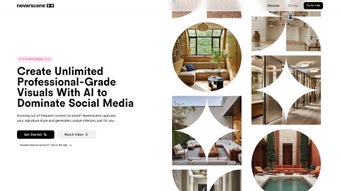
Neverscene is an AI‑powered interior design platform that transforms moodboards into hyper‑realistic 3D visualisations in seconds. The engine analyses colour distribution, texture patterns, spatial relationships, and style cues, then produces multiple design variations that align with the user’s aesthetic preferences. Because the output is rendered at high resolution, designers can present client‑ready visuals that feel tangible and immersive, reducing the need for costly physical mock‑ups or lengthy manual modelling.
Key Feature Set
- AI‑Generated Hyper‑Realistic Renderings: Produce photorealistic 3D visuals in seconds, eliminating the need for manual modelling.
- Moodboard‑to‑Design Workflow: Upload any image collage and let the AI interpret colour, texture, and style to create matching interiors.
- Multi‑Room Support: Generate concepts for living rooms, kitchens, bathrooms, bedrooms, offices, and outdoor spaces with a single click.
- Style Diversity Engine: Choose from modern, minimalist, industrial, classic, boho, or custom style tags to steer the AI’s creative direction.
- Instant Design Variations: Produce multiple design alternatives for the same moodboard, allowing rapid exploration of options.
- Client‑Ready Presentation Packs: Export designs as high‑resolution PNG, JPEG, or interactive 3D web‑view links ready for pitch meetings.
- Full Ownership & Privacy Controls: Retain 100 % rights to all generated assets, with optional cloud sharing for collaborative reviews.
- Seamless Integration with Design Tools: Export models to SketchUp, Revit, or Adobe Photoshop for further refinement.
- Regular AI Model Updates: Stay ahead of trends with monthly algorithm enhancements and new texture libraries.
- Secure Cloud Processing: All uploads are encrypted, and designs are stored on GDPR‑compliant servers.
Pros & Cons (Embedded Within Overview)
Pros
- Instant hyper‑realistic renders dramatically shorten concept‑development time.
- Intuitive moodboard‑driven interface requires no prior 3D modelling knowledge.
- Extensive style library keeps designs current with global trends.
- Full ownership rights protect intellectual property and client confidentiality.
- Seamless export to industry‑standard tools (SketchUp, Revit) for deeper customization.
- Secure cloud processing meets GDPR and CCPA compliance.
Cons
- Requires a stable internet connection for AI rendering; offline mode is limited.
- Advanced customisation (e.g., exact furniture placement) still needs a secondary 3D tool.
- Subscription pricing may be a barrier for freelancers on a tight budget.
- Web version lacks some high‑resolution export options available in the desktop app.
The combination of these strengths and the few noted limitations positions Neverscene as a premium, yet accessible, solution for design professionals who value speed without sacrificing quality.
Installation, Usage Workflow & System Compatibility
Neverscene is designed to be as frictionless as its AI engine. Whether you prefer a native desktop client or a browser‑based experience, the onboarding process guides you from download to the first render in under ten minutes.
Step‑by‑Step Installation
- Download the Installer: Visit the official Neverscene website and click “Download for Windows” or “Download for macOS.” The installer is under 200 MB, ensuring quick download even on modest connections.
- Run the Installer: Launch the .exe (Windows) or .dmg (macOS) file, accept the license agreement, choose an installation directory, and let the wizard complete the copy process.
- Create or Sign In to Your Account: Use an email address or social login (Google, Apple). New users must verify their email to unlock the 14‑day free trial.
- Activate Your License (Optional): If you have purchased a subscription, enter the license key under Settings → License. Validation occurs instantly online.
Typical Usage Workflow
Once the software is installed, the workflow revolves around three core actions: upload, generate, and refine.
- Upload Moodboard: Click “Create New Project,” then drag‑and‑drop your moodboard images or select them via the built‑in photo picker. Neverscene analyses colour, texture, and spatial cues.
- Select Room Type & Style: Choose the desired room (e.g., “Open‑Plan Kitchen”) and apply style tags. The AI instantly renders 4‑6 variations on the right‑hand panel.
- Review & Refine: Hover over a concept for a 360° preview. Use the “Refine” slider to control creativity—lower values stay close to the original moodboard, higher values explore bolder interpretations.
- Export & Present: Click “Export” to save high‑resolution images or generate an interactive web link. You can also push the model directly to SketchUp for detailed tweaking.
The entire process—from moodboard upload to final export—typically takes under five minutes, giving you more time to focus on sourcing, budgeting, and client communication.
System Compatibility
Neverscene runs on Windows 10/11 (64‑bit) and macOS 12 Monterey or later. A lightweight web version is also available for Chrome, Edge, Safari, and Firefox, offering on‑the‑go access when a full desktop install isn’t practical. While the desktop client provides the best rendering performance, the web app maintains full feature parity for most day‑to‑day tasks.
Frequently Asked Questions
Can I use Neverscene for commercial projects without extra licensing fees?
Yes. All generated designs belong to the user who created them, regardless of whether the project is residential or commercial. No additional royalties are required.
What file formats does Neverscene export?
Neverscene exports high‑resolution PNG, JPEG, and TIFF images. For 3D models, it supports OBJ, FBX, and native SketchUp (.skp) files.
Is there a free trial, and how long does it last?
A 14‑day free trial is available for new users, providing unlimited access to all features and up to 20 design exports.
How does Neverscene protect my uploaded moodboards?
All uploads are encrypted in transit (TLS 1.3) and at rest. Files are stored on secure servers that comply with GDPR and are automatically deleted after 30 days unless you choose to keep them in your private library.
Can I integrate Neverscene with my existing project management tools?
Yes. Neverscene offers API endpoints and Zapier connectors that let you push generated renders directly into tools like Trello, Asana, or Monday.com.
Conclusion & Call to Action
Neverscene represents a quantum leap for interior designers who want to blend artistic intuition with AI‑powered efficiency. By turning a simple moodboard into a suite of polished, photorealistic concepts, the platform eliminates the repetitive drafting phase and frees creative energy for higher‑value tasks such as material sourcing, client storytelling, and strategic planning. While a reliable internet connection and a subscription cost are required, the productivity gains—often measured in hours saved per project—easily offset those considerations. Whether you’re a seasoned studio looking to scale output or a freelance designer seeking a competitive edge, Neverscene equips you with the tools to deliver compelling visuals faster and more securely than ever before.
Ready to transform your design workflow? Download Neverscene now, start your free trial, and experience the future of interior design today.
Pros: Lightning‑fast rendering, intuitive moodboard interface, full ownership rights, high‑resolution exports.
Cons: Requires internet, subscription pricing for freelancers.



.png)



